I recently had some major performance issues when running Age of Empires II: Definitive Edition over Steam Remote Play. The game would run fine locally, and also when streaming via Parsec, but over Remote Play I would only get about 15fps.
What was extra weird is the game would run perfectly smoothly as long it wasn’t exclusively in the foreground. Press the start menu, or open an overlay and the game in the background would jump to a perfectly smooth 60fps but re-foreground it and it would immediately drop back down to 15fps.
When I enable the diagnostic info it told me that there was a “slow encode” issue and that my encoder was:
Encoder: game polled D3D11 NV12 + NVENC H264
However when an overlay was up (and it was running smoothly) it would say:
Encoder: Desktop NVFBC NV12 + NVENC H264
After quite a lot of troubleshooting I managed to find a fix. This is what I fixed it for me (likely only works with nvidia GPU).
Streaming Host Config
Make sure your Steam Remote Play, Advanced Host Options looks like this:
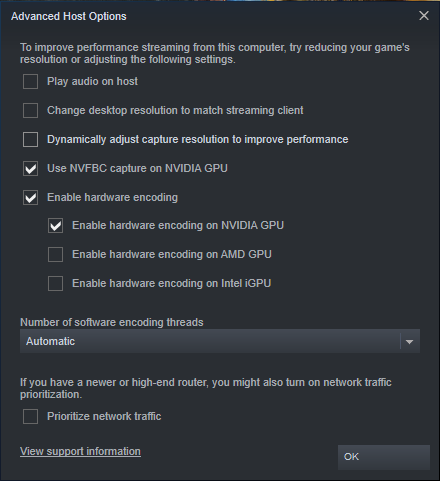
In particular the Use NVFBC setting matters. Note, you will have to stop Remote Play, and reconnect to have the new settings take effect. (if you were already connected)
Then download and install Geforce Experience. Make sure you run it once and log in and everything.
Then restart the computer.
Then run the game! Hopefully it should be working now!
There are definitely lots of weirdly interacting pieces here. Neither enabling Use NVFBC nor installing Nvidia Experience worked by itself but both combined appear to do the trick.
When I did this (and it took quite a few retries to figure out that it was these two things combined that fixed it) it somehow forces Remote Play to stay with Encoder: Desktop NVFBC NV12 + NVENC H264 even when the game is in the foreground and everything runs smoothly.
I suspect some very dark magic interactions between the Geforce Experience in-game overlay and Remote Play are what make this work. If I were to guess I would suspect that the Geforce overlay is what Remote Play thinks is in focus and it fools it picking a capture mode that ends up working better.